

Does this sound familiar? You have spent hours crafting the perfect blog post. You nailed the keyword density, optimized the meta tags, and hit publish with high hopes. But the post vanished into page 10 of the search results, never to be seen again.
Pouring resources into content that delivers zero visibility is incredibly frustrating. But for many content marketers and SEOs, this remains a daily reality. The problem usually has nothing to do with the quality of your writing. The problem lies in the structure of your site.
Here is the hard truth. The era of keyword sniping and targeting individual keywords in isolation is fading fast. Search engines like Google have evolved. They no longer just scan for matching words. They evaluate semantic authority. They want to know that you are a genuine expert on a broad subject, not just a lucky guesser on a single phrase.
SEO is moving from “Keywords” to “Context.” If your content is a library, topic clusters are the organized shelves that help Google find the right book.
When your content is scattered across your blog without connection, you are essentially competing against yourself. Isolated posts struggle to gain traction because they lack the contextual support needed to signal authority to search algorithms.
This is where the concept of a topic cluster emerges as the gold standard for modern site architecture. By organizing your content into deliberate, interconnected hubs, you transform isolated articles into a powerful ecosystem that dominates search results.
However, simply writing more content will not solve the problem. You need to truly understand what a topic cluster is and how each component works before you can build a strategy that actually drives traffic. Let’s dive in.
Table of Contents
- What is a Topic Cluster?
- The Three Pillars of a Cluster
- Why Your SEO Strategy Needs Clusters
- Step 1: Choose Your Core Topic
- Step 2: Conduct Subtopic Keyword Research
- Step 3: Audit and Map Existing Content
- Step 4: Design the Pillar Page
- Step 5: Create Supporting Cluster Content
- Step 6: Execute the Internal Linking Strategy
- Step 7: Track Performance and Refine
- Common Topic Cluster Mistakes
- The Cluster in Action: A Real-World Example
- Topic Cluster Checklist
What is a Topic Cluster? (Definitions & Basics)
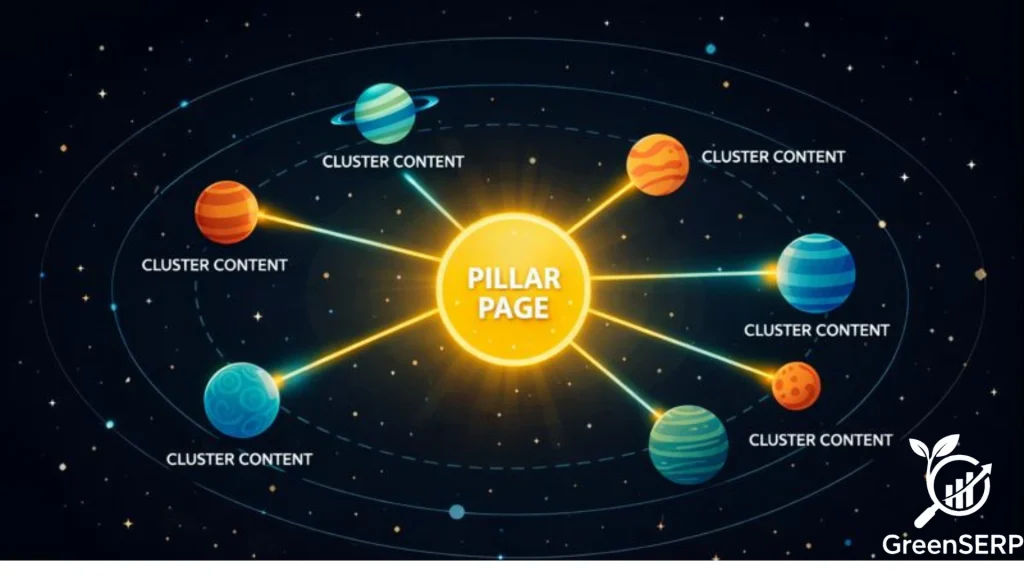
A topic cluster is a group of related web posts that cover a broad subject in detail. Instead of focusing on single, disconnected keywords, this method organizes your site around central themes.
You create one comprehensive main page and link it to several smaller, focused pages. This structure tells search engines that your website holds genuine expertise on that particular subject.
Modern search engines like Google no longer evaluate individual keywords in isolation. They now analyze the relationships between different topics and the intent behind every user query. Topic clusters facilitate this understanding directly.
By grouping your content into a cohesive structure, you make it significantly easier for bots to crawl your site, map the connections, and surface relevant information to searchers.
The Three Pillars of a Cluster
Every effective cluster consists of three specific components. Missing any one of them will break the structure and reduce the SEO benefits.
The Pillar Page
The pillar page serves as the foundation of your cluster. It provides a high-level overview of a broad topic, answers common questions, and touches upon various subtopics without going into extreme detail. Think of it as the central hub of your content wheel.
Cluster Content
Cluster pages are smaller, more focused articles that dive deep into specific aspects of the core topic. Each piece of cluster content targets a long-tail keyword related to the pillar page. If your pillar page covers “Content Marketing,” a cluster page might explore “How to Write a Meta Description” or “Best Content Calendars for Small Teams.”
Internal Links
Hyperlinks act as the glue that holds the cluster together. Every cluster page must link back to the pillar page. The pillar page should link out to every piece of cluster content. This bi-directional linking signals to search engines that all these pages are semantically related and part of the same authoritative hub.
Greenserp Tip: Your pillar page should ideally target a short-tail keyword (e.g., “Digital Marketing”), while your cluster pages target long-tail phrases (e.g., “Best Digital Marketing Tools for Small Businesses”). This division allows you to capture both high-volume searches and specific, high-intent queries.
Pillar Page vs. Cluster Content: A Quick Comparison
| Feature | Pillar Page | Cluster Content |
| Scope | Broad and Comprehensive | Narrow and Deep Dive |
| Keyword Type | High Volume / Short-Tail | Specific / Long-Tail |
| Word Count | 2,000+ words | 800–1,200 words |
| Goal | Establish Topical Authority | Answer Specific Questions |
| Linking Role | Hub (links out to all clusters) | Spoke (links back to the hub) |

Why Your SEO Strategy Needs Clusters
Search behavior has changed significantly over the last decade. People now use longer, more conversational queries. Voice search has pushed the need for context over simple keyword matching. Topic clusters address these shifts directly.
Building topical authority. When you cover every angle of a subject, Google views your site as a trusted source. This often leads to higher rankings across all pages within the cluster, not just the pillar page. Your entire domain benefits.
Improving user experience. Your readers can easily find more information on a subtopic by following your internal links. This keeps people on your site longer and reduces bounce rates. A well-organized site is a helpful site, and search engines reward helpfulness.
Creating compounding returns. Unlike isolated posts that rely solely on their own backlinks, clustered content passes authority between pages. Every new cluster article you publish strengthens the entire group.
Step 1: Choose Your Core Topic
Your success begins with selecting the right central theme. You need a topic that is broad enough to break down into multiple sub-pages but narrow enough to stay relevant to your audience and business.
Start by looking at your business goals. What is the main product or service you offer? If you sell gardening tools, a strong pillar topic might be “Organic Vegetable Gardening.” This subject carries enough depth to support dozens of sub-posts.
Avoid topics that are too narrow. For example, “How to Grow Red Tomatoes in June” works as a blog post, not a pillar page. The topic lacks the depth required to sustain 10 or 20 related articles. Aim for a subject that could reasonably support at least eight distinct subtopics.
Ask yourself these questions before committing:
- Does this topic align with what your business ultimately sells or offers?
- Can you brainstorm at least eight unique subtopics without straining?
- Does the main keyword have meaningful search volume?
- Would your target audience consider you a credible source on this subject?
- If you answer yes to all four, you have a strong candidate.
Step 2: Conduct Subtopic Keyword Research
Once you have your pillar theme, you must identify the questions your audience is actually asking. Use keyword research tools like Ahrefs or SEMrush to find related phrases and long-tail keywords. If you are starting on a limited budget, these best free AI SEO tools can handle the basics without a paid subscription
Look for “People Also Ask” boxes on Google. These provide direct insight into the specific problems users are trying to solve. For a gardening pillar, you might find subtopics like “Best soil for organic vegetables,” “Natural pest control methods,” or “Composting for beginners.”
Classify Keywords by Search Intent
Not all keywords serve the same purpose. Understanding search intent categories will help you build a cluster that guides users through their journey:
Informational Intent: The user wants to learn something. (“What is composting?”) These queries form the backbone of most topic clusters because they build trust and establish your expertise before any purchase decision.
Navigational Intent: The user wants to find a specific page or brand. (“Ahrefs keyword tool”)
Transactional Intent: The user is ready to take action or buy. (“Buy organic fertilizer online”)
Your cluster content should primarily satisfy informational intent. By answering your audience’s questions thoroughly, you earn their trust. That trust is what eventually drives conversions. Save transactional content for your product or service pages, not your cluster articles.
Group keywords carefully. Every piece of cluster content should satisfy a unique search intent. If two keywords are so similar that a single article could answer both, combine them into one subtopic. Your goal is a list of distinct articles, each providing unique value.
Step 3: Audit and Map Existing Content
You do not always need to start from scratch. Most established websites already have content that fits into a new cluster.
List all your current blog posts and pages. Identify which ones relate to your new pillar topic. You might find three different posts about soil quality already published on your site. These can be updated, consolidated, and linked to your new gardening pillar page.
Mapping involves making key decisions:
- Which existing page will serve as the pillar?
- Which existing posts can function as cluster content with minor updates?
- Which subtopics have no existing content and need to be created from scratch?
- Are any existing posts covering the same subtopic and cannibalizing each other?
If you have a strong existing post that already performs well in search, consider expanding it to become the pillar page. This approach saves time and leverages existing SEO equity, including any backlinks and ranking history that page has accumulated.
Step 4: Design the Pillar Page
Your pillar page must be a comprehensive resource. It should provide a clear definition of the topic and summarize every subtopic you plan to cover in the cluster.
Use a clear structure with H2 and H3 headings. Each heading should represent one of your cluster subtopics. Under each heading, provide a brief explanation, essentially a “tip of the iceberg” summary that gives the reader enough context to understand the subtopic and motivates them to click through to the full cluster article.
Include a table of contents at the beginning. This helps users jump directly to the section they care about most.
Remember, your pillar page is meant to be a comprehensive reference point. It should be significantly longer than a standard blog post, often exceeding 2,000 words, to ensure it covers the full breadth of the subject. However, length alone does not equal quality. Every section must deliver genuine value.
Greenserp Tip: Structure your pillar page so that each H2 section naturally leads into a link to the corresponding cluster article. This creates a seamless reading experience where users organically discover your deeper content rather than feeling forced to click.
Step 5: Create Supporting Cluster Content
Now you fill in the gaps with new articles. Each cluster post should focus on one specific keyword or question you identified in Step 2.
Write these posts with depth in mind. While the pillar page gives an overview of “Natural Pest Control,” the cluster post should explain exactly which organic sprays to buy, how to apply them, which pests they target, and what results to expect.
Maintain a consistent tone across all pages. Your readers should feel like they are moving through a cohesive guide as they navigate from the pillar to the cluster posts. Jarring shifts in voice or quality will break that experience.
Ensure each page provides a clear call to action. Whether you want the reader to explore another cluster article, download a resource, or contact your team, give them a logical next step. Every page should keep the user engaged with your brand.
Step 6: Execute the Internal Linking Strategy
Linking is the most technical part of building a cluster. You must be methodical and intentional.
Cluster to Pillar: Every cluster post must contain a link back to the pillar page. Use descriptive anchor text that includes the pillar’s main keyword or a close variation. This tells Google exactly what the destination page covers.
Pillar to Cluster: Go to your pillar page and find the section that discusses each subtopic. Add a link from that section to the corresponding cluster post. Repeat this process for every single article in the cluster.
Cluster to Cluster: Links between cluster posts can also strengthen the structure, especially when two subtopics are closely related. A post about “Composting for Beginners” might naturally reference your article on “Best Soil for Organic Vegetables.”
Pro Tip: Practice anchor text diversity. Do not use the exact same keyword phrase for every link pointing back to your pillar page. Use natural variations. For example, if your pillar targets “Organic Vegetable Gardening,” your anchor texts across different cluster posts might read “organic vegetable gardening guide,” “growing vegetables organically,” or “our complete guide to organic gardening.” This variety looks natural to Google and reduces the risk of over-optimization penalties.
The primary focus should always remain on the connection between the pillar and the sub-pages. This “hub and spoke” model is the most effective architecture for passing authority between pages.
Step 7: Track Performance and Refine
SEO is never a one-time task. You need to monitor how your cluster performs over time and make data-driven adjustments.
Use analytics tools to track organic traffic to the pillar page and every cluster post. Pay attention to which pages are ranking for their target keywords and which are stalling.

Key Metrics to Monitor
Organic Traffic Growth: Are your cluster pages gaining visibility over time?
Keyword Rankings: Which cluster posts are hitting their target positions, and which are stuck?
Internal Link Click-Through Rate: Are users actually clicking the links between your pillar and cluster pages? Low click-through rates may indicate that your anchor text or link placement needs improvement.
Bounce Rate: Are readers engaging with the content or leaving immediately?
Assisted Conversions: Track whether your informational cluster content is playing a role in the conversion path. A user might read three cluster articles before purchasing. Without tracking assisted conversions, you would never see that value, and you might mistakenly cut content that is quietly driving revenue.
Time on Page: Longer engagement signals content quality to search engines.
Look for gaps in your cluster: Are users asking new questions that you have not covered yet? If so, write a new cluster post and link it into the existing structure. Keeping the cluster updated ensures that your topical authority remains strong as search trends evolve.
If a cluster post is not performing well, check its internal links first. It might need more support from the pillar page, improved content quality, or better keyword targeting.
Common Topic Cluster Mistakes
Many marketers make errors that prevent their clusters from delivering results. Avoid these common pitfalls to ensure your strategy succeeds.
Overlapping Content
Do not write two cluster posts that cover nearly the same subtopic. This creates keyword cannibalization. When two pages on your site compete for the same keyword, Google may choose to rank neither of them. Always ensure each post has a unique purpose and targets a distinct query.
Broken Links
Your cluster relies entirely on links. If you change a URL and forget to update your internal links, the cluster breaks. Regularly audit your site for 404 errors and broken connections within your topic groups. One broken link can sever the authority flow between pages.
Weak Pillar Pages
A pillar page that is too short or lacks useful information will not rank. It needs to be the best resource available on the web for that broad topic. If your pillar page reads like a list of links without any substantive content, it will not provide enough value to users or search engines.
Forgetting the User
While clusters are powerful for SEO, they must also be genuinely useful for humans. Do not force internal links where they feel unnatural. If a link disrupts the reading flow, your audience will not click it. Always prioritize the reader’s experience over a rigid linking formula.
The Cluster in Action: A Real-World Example
Abstract concepts become much clearer with a concrete example. Here is how a fitness brand might structure a topic cluster:
Pillar Page: The Ult-mate Guide to Strength Training
This comprehensive page covers the fundamentals of strength training, including its benefits, basic principles, common equipment, nutrition considerations, and programming basics. It provides overview-level information on each subtopic and links out to every cluster article.
Cluster Articles:
- Cluster Article 1: Best Protein Powder for Muscle Gain — A deep dive into protein supplementation, comparing products, explaining timing, and recommending options for different dietary needs.
- Cluster Article 2: How to Do a Perfect Deadlift — A detailed technique guide covering form, common mistakes, variations, and progressive overload strategies.
- Cluster Article 3: 5-Day Workout Split for Beginners — A complete training program with sets, reps, rest periods, and weekly scheduling advice.
- Cluster Article 4: How to Prevent Injuries During Weight Training — Covering warm-ups, mobility work, recovery protocols, and warning signs of overtraining.
- Cluster Article 5: Strength Training vs. Cardio: Which Burns More Fat? — An evidence-based comparison addressing a common audience question.
Every cluster article links back to the pillar page. The pillar page links out to each cluster article within its relevant section. Related cluster articles also cross-link to each other where the connection feels natural.
The result? The fitness brand covers “Strength Training” from every angle. Google recognizes this comprehensive coverage and rewards the entire cluster with stronger rankings. A user searching for deadlift form discovers the technique article, follows a link to the beginner workout split, then lands on the pillar page. That single visitor has now engaged with three pages, each one reinforcing the brand’s authority.
Topic Cluster Checklist
Use this checklist to ensure your cluster is complete and fully optimized before you consider it finished.
- Broad Core Topic: The main subject is large enough to support 8–20 subtopics.
- Keyword Research: You have identified specific long-tail keywords for every cluster post.
- Search Intent Alignment: Each cluster article satisfies a distinct search intent, primarily informational.
- Comprehensive Pillar Page: The main page covers the entire topic and provides summaries for all sub-pages.
- Unique Cluster Posts: Each sub-page provides deep, unique value without overlapping with other cluster articles.
- Bi-Directional Links: The pillar links to all clusters, and all clusters link back to the pillar.
- Anchor Text Diversity: You are using keyword variations in your internal links instead of repeating the same phrase or using generic text like “click here.”
- Optimized Metadata: Every page has a unique title tag and meta description.
- Navigation: A user can easily find the pillar page from your main site menu or homepage.
- Visuals: You have included images, charts, or tables to help explain complex parts of the topic.
- Cross-Linking: Related cluster articles link to each other where the connection is natural.
- Performance Tracking: You have set up analytics to monitor traffic, rankings, and assisted conversions for every page in the cluster.
- Update Schedule: You have scheduled a review to refresh the cluster and add new content within six months.